
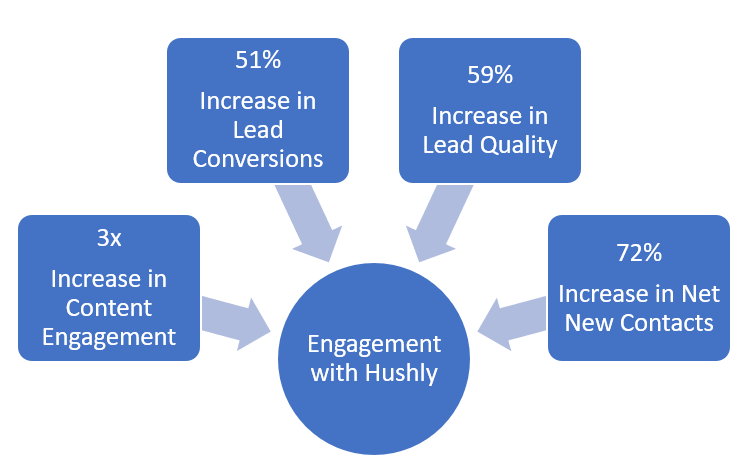
The major goal of content marketing is to capture lead information. Hushly increases the B2B landing page conversions.
Benefits of Using Hushly
The features of Hushly are:
-
- Intuitive setup.
-
- Engaging users with Experiences, Overlay Experiences, Streams, and Hubs.
-
- Increasing content consumption through content previews.
-
- Increasing engagement through personalized recommendations.
-
- Increasing mobile conversion optimization by reducing form fields when opting in.
-
- Increasing lead quality by filtering out non-business emails, enriching leads, and human-verifying.
-
- Inbuilt compliance with GDPR and CASL.
-
- Publishing the lead information to CRM systems through integration.
-
- Tracking content performance using analytics.
-
- Competitor management.
All the above features lead to the reduction of the costs of lead capturing and an increase in the rate of lead conversion.
Audience
Demand generation and marketing operations departments, content marketers and strategists, media buyers, and sales leaders responsible for lead distribution and ROI analysis are the intended audiences of this knowledge base.
UI Conventions
The following table describes the UI conventions used in the Hushly UI.
| Icon | Description |
| * | Mandatory |
 |
Search |
 |
Create |
 |
Hint |
 |
Test |
 |
Preview |
 |
Hidden |
 |
Duplicate or Copy |
 |
Delete |
 |
Edit |
 |
Preview of content on a mobile |
 |
Preview of content on a tablet |
 |
Preview of content on a desktop |
 |
Open |
 |
Hubs |
 |
Manually added |
 |
Added using an Automation Rule |
 |
Home Stream |
 |
Calendar |
 |
Maximize the view |
 |
Minimize the view |
 |
Download |
 |
Map values |
 |
Grid view |
 |
Chart view |
 |
Return to the previous page |
Typographic Conventions
The following table describes the typographic conventions used throughout the documents.
| Notation | Description |
| <Bold> | This formatting is used for user interface elements such as pages, dialogue boxes, buttons, and fields. |
| <code> | This formatting is used for software code phrases within a paragraph. |
| <Reference> | This formatting is used for referring sections in the document or to web links. |
| <List Item> | This formatting is used for listing items in the selection list. |
Graphical Conventions
The following table describes the graphical conventions used throughout the documents.
| Note: | Information that you should take note of. |
| Important: | Information that is important. |
| Warning: | Information that warns about the likelihood of data loss. |